Thematic Question Base
Parameters
When I create or modify a question base, I define:
- The full name of the base
- Its author (by default, the user who creates the base)
- The color that will help easily identify the base in lists
- The validity duration of the questions, meaning the duration beyond which a question may become obsolete and needs to be validated again.
Settings
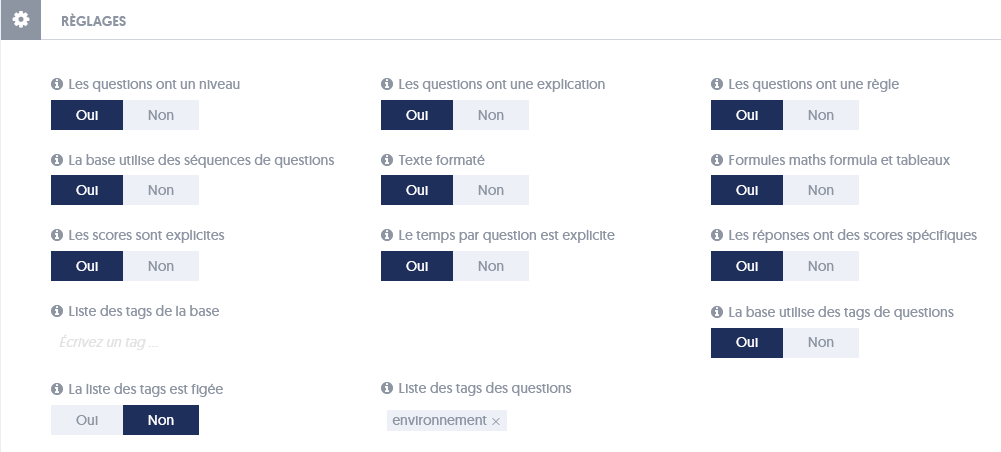
I can thus define:
- If I want to assign a specific difficulty level to each question
- If I want to be able to enter an explanation and a related course reminder for each question
- If I want to be able to define sequences of questions in this base.
- If I want to use formatted text (bold, italic, headings, images, hyperlinks, etc.) when entering questions and answers within this base.
- If I wish to integrate mathematical formulas into my questions.
- If I wish to indicate a specific score for each question, meaning that some questions may be worth more than others.
- If I wish to define my own time limit for each question. If I do not use this option, an estimated time limit will be calculated automatically based on the question parameters.
- If I wish to define specific scores for answers, meaning that some answers, if chosen, yield more points than others. In this case, it will also be possible to assign a negative score to certain answers.
It should be noted that these different options allow for adapting the question entry/modification pages to your needs while keeping them as simple as possible. If you specify that you do not want to enter an explanation associated with the questions, then that information will not be present, simplifying your interface.
However, just because you add an explanation to each question does not mean it will be presented to users taking a test: here we define the information associated with the questions, but it is at the questionnaire level that we will determine if this information should be used and how.
It is possible to first create a base with limited options and then activate certain advanced options later.
Domains
I can also structure the theme of the base into domains, which are like sub-themes or chapters that will help organize the questions well.
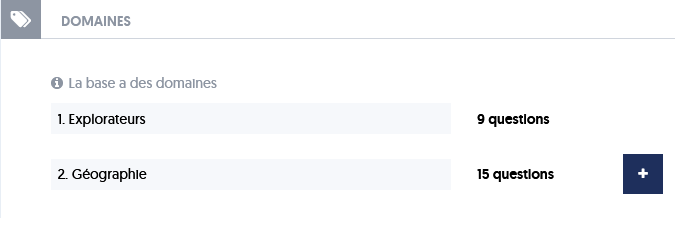
If domains are used for a base, then each question will be assigned to one of the domains that we have defined.
Domains primarily serve two purposes:
- On one hand, they allow for creating questionnaires focused on a sub-theme, which will take questions belonging to a particular domain or a list of domains.
- On the other hand, they allow for a more detailed analysis of the results of an evaluation by presenting not only an overall score but also a score for each of the domains covered by the questionnaire.
Question Tags
Question tags are an optional feature associated with a base. Tags are labels that characterize the questions. Each question can be associated with different tags.
To implement this feature, one must first select the Tags option at the company options level, and secondly select the option The base uses question tags at the base settings level.
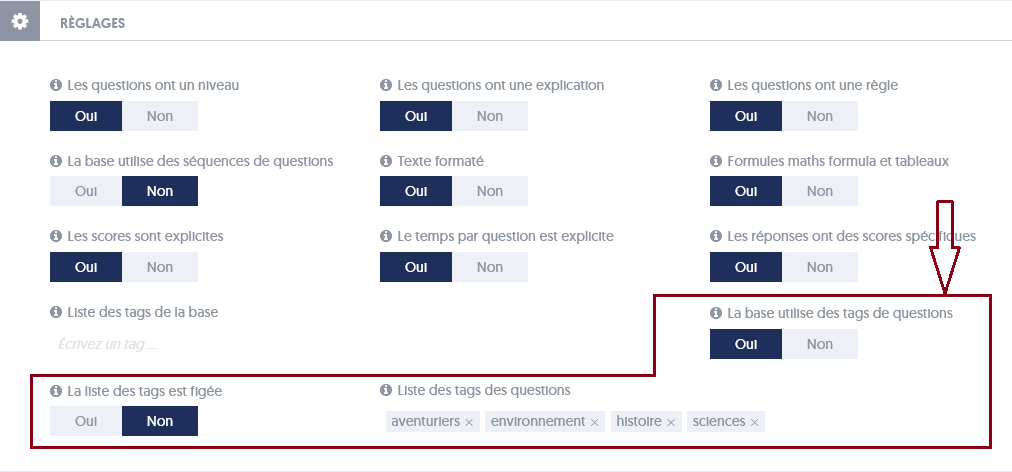
There are two modes of operation for question tags:
- Either the list of tags is fixed, meaning it will not be possible to add new tags when creating or modifying a question; one can only choose from the proposed tags. In this case, the list of tags is defined at the question base settings level. It can be expanded, but only at that location.
- Or the list is not fixed; it is extensible, meaning it will be possible to add new tags when creating or modifying a question. At the question base level, one will always have the consolidated list, which is the sum of the tags used by the different questions in the base. If a tag has been used but is no longer in use, it remains in the consolidated list.
Note that the base itself can also be characterized by tags. This is a different feature that will be described later.
Similar to domains, tags allow for a more detailed analysis of the results of an evaluation by breaking down the score according to the different tags of the proposed questions.
Tags are a more flexible mechanism than domains, as the same question can be associated with multiple tags or no tags at all.
Archiving Bases
Archiving question bases is an advanced feature that is only offered when you have chosen the corresponding option at the company options level.
Archiving bases is useful when you have created many question bases, some of which are no longer frequently used. You do not want to delete them, but you prefer that the list of bases is not cluttered with these underused bases.
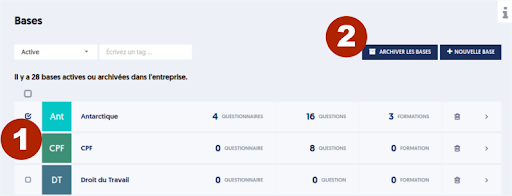
When the feature is activated, you have a filter (marker [1] in the image) on the bases page that allows you to display only active bases (non-archived), or only archived bases, or all bases.
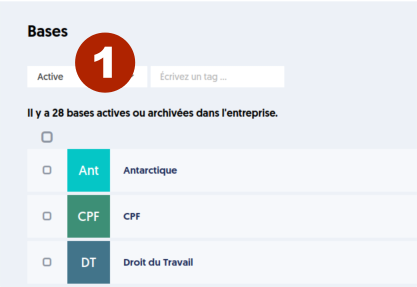
To archive a question base, from the list page of bases, simply:
- Select one or more bases by checking the box to the left of the line (Marker [1] in the image).
- Click on the Archive Bases button at the top right (Marker [2] in the image).
Archiving question bases simply helps to clarify your list of bases; no entity is deleted, and you just need to select all statuses in the filter to view all archived bases.
Article Navigation
Previous Previous Article: The Trainer: Using Questionnaires and Media