List of Signature Sessions
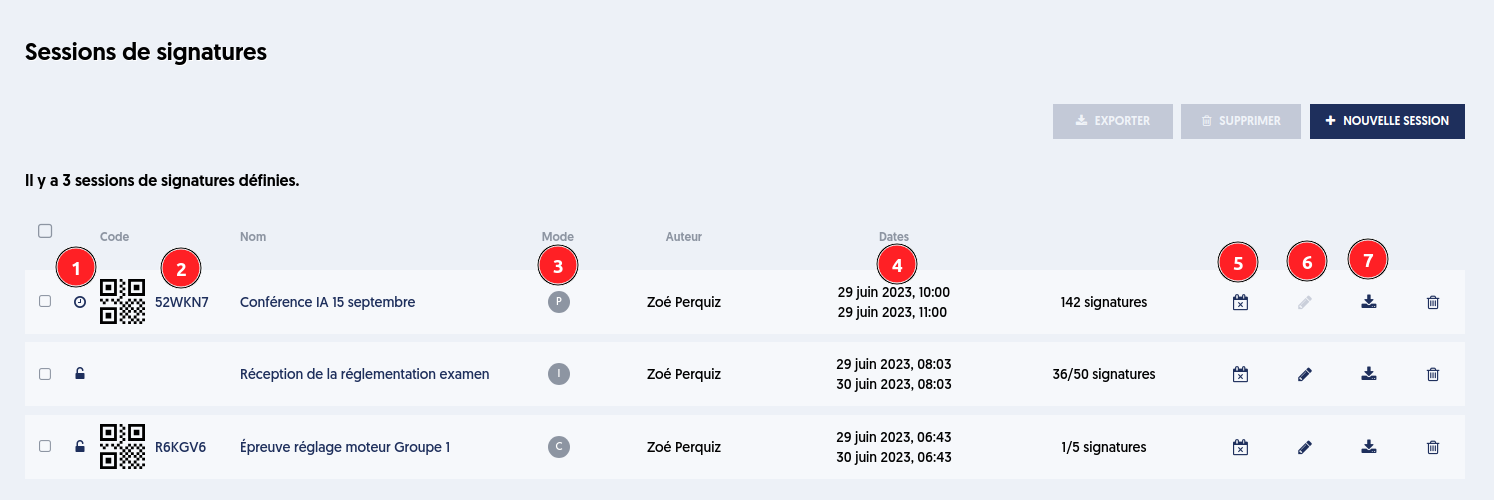
The list of signature sessions presents one session per line with the following information:
[1] The status of opening (closed, open, future)
[2] the QR-Code and its link except in "individual" mode
[3] the mode of the session (Public, Individual, Collective)
[4] the period during which the session is open
[5] the change of opening dates
The list of sessions shows the unique and common QR-Code in public or collective mode. It is possible to modify the end date of opening as long as the session is open and to manage the participants.
Note that the QR-Code presented in [2] is just a symbolic pictogram; it is not a real QR-Code. By clicking on this pictogram, the QR-Code linked to the signature session will be displayed in a new tab.
The 6-letter code next to it can also be used to participate. An administrator will usually send this link and/or the QR-Code to the participants.
Once the session is closed, the QR-Code disappears.