User and Email Search
The search for two entities has been enhanced to facilitate your daily management:
- An advanced search for users
- A powerful search engine for your emails
Users
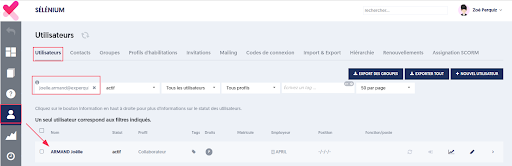
You can now quickly find a user using several search criteria. This allows you to better manage their follow-up and find the right people at the right time.
- By identity: Type first name and last name, separated by a space.
Example: Jean Dupont - By attribute (hierarchical structure or other): Use a slash / to target a department or role.
Example: user/hr (for human resources)
Available attributes: direction, department, pole, team, employee ID. - By phone: Enter a string of digits in the format of a number with digits and spaces.
Example: 31 31 will return numbers containing this sequence. (06 31 31 xxx) - By admin role: Type [admin] to filter for administrators only.
- By permissions: Type [permissions] to find users with certain specific permissions.
- By email: Enter the exact address.
Example: jean.dupont@experquiz.com
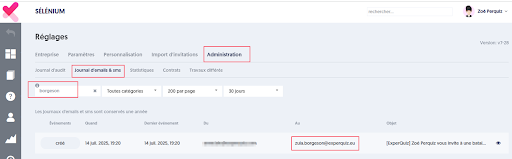
Emails
Tracking messages is essential to ensure that activities are sent and received properly.
- Search by whole words: Only whole words are considered.
Example: Ant will not find Antarctic.
Analyzed fields are:
– Subject
– Body of the message
– Recipient - Free search: All entered words must appear at least once in one of the fields.
Example: Antarctic aurelie will return emails mentioning Antarctic and sent to aurelie@experquiz.com. - Exact search: Put a phrase in quotes to find it exactly as is.
Example: “evaluation on 03/12/2025” - Search by email: Type the exact address of the recipient.
Example: aurelie@experquiz.com