Module Invitations
Once your module is defined, you can invite users to follow it. To do this, go to the Invitation tab of the module page.
Only users registered in your company or organization can be invited to follow a module. Unlike questionnaires, you cannot invite simple contacts, that is, people for whom you haven't created an account on ExperQuiz.
The invitation page is probably familiar to you, as it is identical to the one used to invite someone to a questionnaire, a training, or a cycle.
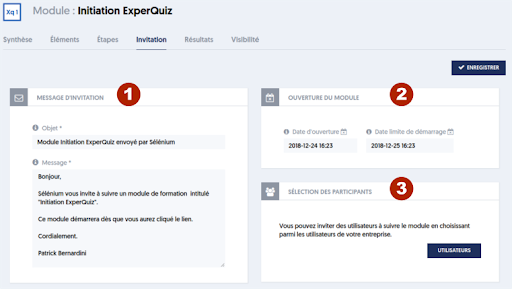
The page consists of three blocks:
- [1] Definition of the invitation message: this is the message that the invited people will receive, either by email or by SMS.
- [2] Module opening period: this is the period during which invited people can start the module. Please note that once the module has started, it is the specified duration for the module that defines the end date. As specified on this page, we set the start deadline here, not the end date.
- [3] The participant selection block. Initially, you only see a USERS button. When you click on this button, the participant selection panel appears on the right. We have already described it previously, so we will not revisit it here. Once you have selected the users to invite, the panel closes, and the names of the participants will have been recorded in block [3]. The SAVE button will have been replaced by an INVITE button. By clicking on this button, the invitations will be sent to the participants.