Add and Remove Participants from an Ongoing Assessment
You can add participants to an assessment as long as the end of the opening period has not been reached. You can also remove participants if they have not yet played. If the invitation has already been sent to them, a warning message will be presented when they try to start the test.
In the list of assessments, you have an 'add participant' button.

By clicking this button, you will reach a page that allows you to manage participants:
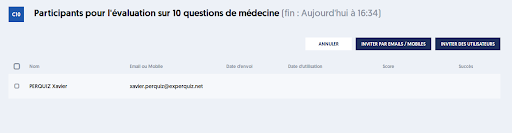
To add participants, click on one of the buttons:
- INVITE BY EMAILS / MOBILES
- INVITE USERS
The procedure will be the same as the one we detailed above.
Note that you can add both registered users and contact users for the same assessment.
To remove users, select one or more participants by checking the box to the left of their names; a new button will appear, titled REMOVE.
After confirmation, the selected users will be removed, meaning they will no longer be participants in the assessment.