Invitation to a Cycle
As we saw for the assessments, you can invite users to a cycle. This means that, at the deadlines that have been defined, they will receive an invitation to take the scheduled test.
To invite users to a cycle, go to the Invitations tab.
The operational procedure is exactly the same as for invitations to assessments, training, surveys, or modules.
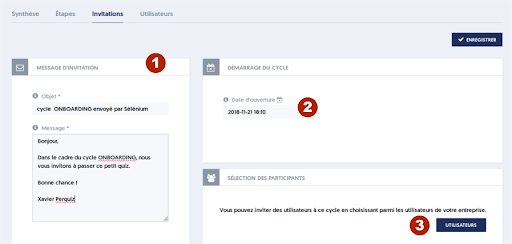
You can indicate:
- [1] The message that will be sent to participants for each of the tests in the cycle.
- [2] The start date of the cycle, which is the T0 of the planning, and by default is on the day of the invitation.
- [3] Finally, click the USERS button to select the users to invite.
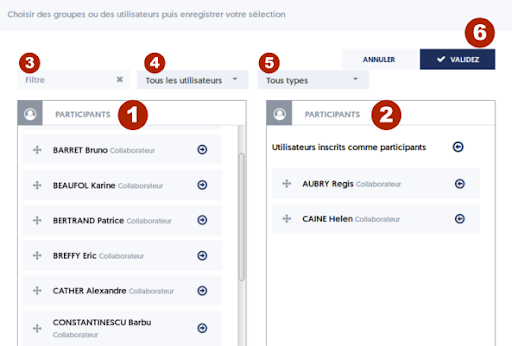
The operational procedure is the one you know: select the users you want to invite by moving them to the right column, either by drag-and-drop or using the right-arrow and left-arrow buttons. You can move all users from one column to the other column with the larger arrow buttons located at the top of the list.
To find the users you want to invite, you can use the 3 filtering options:
- [3] Text search for a user: you can enter the first letters of a name, a first name, an email address, etc.
- [4] Selection of a group of users via the dropdown list.
- [5] Selection of a type of users.
When the list of participants is established, click the [6] VALIDATE button.
The panel closes, and you are still on the invitations page. Just click the INVITE button to finalize the invitations.