Layout Principles
ExperQuiz pages are built according to consistent principles, allowing users to quickly find their bearings, regardless of the page.
In the following image, we identify the most general principles, the parts that are almost universal.
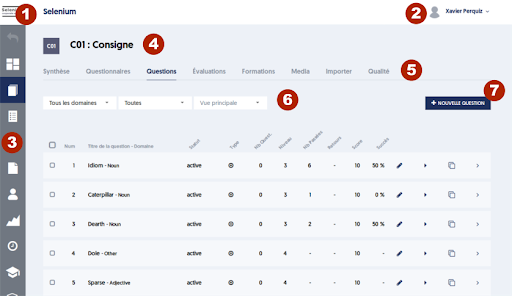
- [1] The logo and the name of your company. By clicking on the logo, you can return to your dashboard.
- [2] Your name, and the dropdown menu that gives access to your profile, allowing you to log out or switch from administrator mode to user mode.
- [3] The main menu, located on the left side of the page. A text version of each choice appears when hovering the mouse over it. You can configure the options you want to see in this menu, and those that will be hidden.
- [4] Title area, depending on the page.
- [5] Tab area. Many pages offer tabs that provide access to "sub-pages".
- [6] Filters area. This is generally present on item list pages. By configuring the different filters, you reduce the list of entities presented.
- [7] Buttons area. When action buttons are offered, they are located in this area, at the top and right of the page.