Resetting Question Statistics
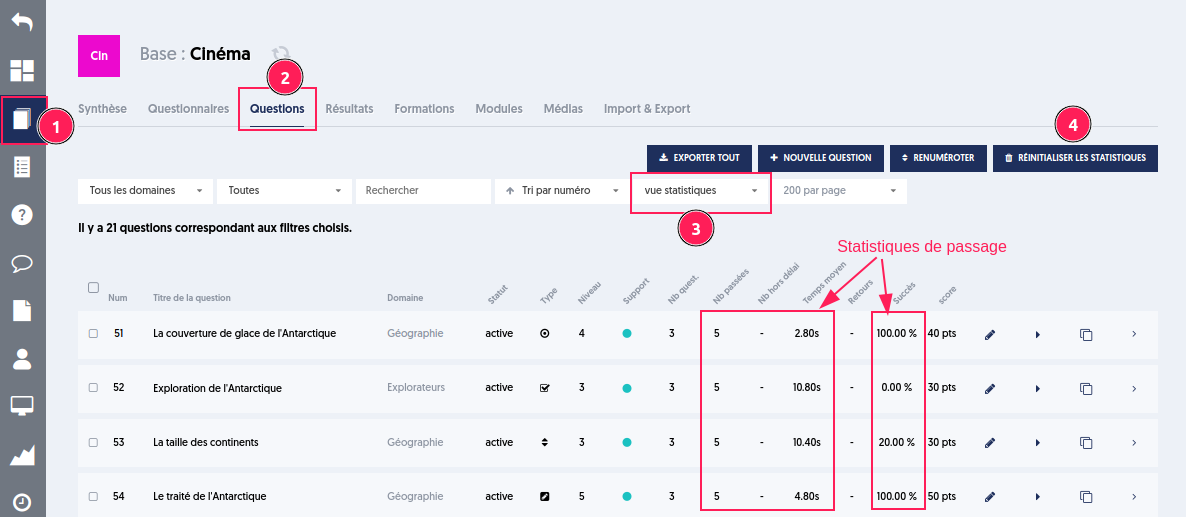
ExperQuiz presents a statistical view on the questions page. You can thus consult the number of times a question has been submitted, its success rate, the average time spent answering it, and the number of out-of-time cases (when the participant did not have enough time to respond).
To do this, you need to choose your database [1], go to the questions tab [2], and filter for the statistics view [3].
This is a history that accumulates data over time.
It is possible to reset these statistics by clicking the "Reset Statistics" button [4].
Article Navigation
Previous Previous article: Archiving Questionnaires
Next Next article: Questionnaire or public module with identification