Define a Cycle
To create a cycle, go to the Cycles page and click the NEW CYCLE button.
Give your cycle a name, and specify the author if applicable. You can also enter a more complete description.
Next, go to the Steps tab to define the steps of your cycle. The page looks like this:
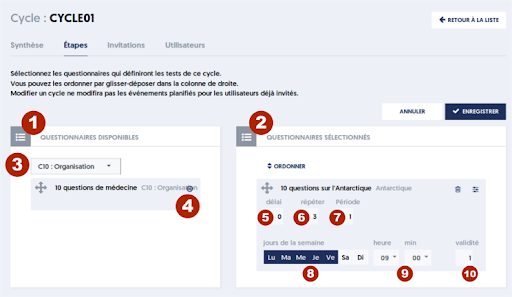
This page allows you two things:
- On one hand, selecting the questionnaires that will be involved in the cycle.
- On the other hand, specifying the scheduling details for each questionnaire.
As seen on many other pages of ExperQuiz, you have two columns: on the left (marker [1]) is the list of available questionnaires, and on the right (marker [2]), the selected questionnaires to be involved in the cycle.
In the left column, you can filter the list based on specific criteria (marker [3]).
To select a questionnaire, you can either click the button with a right arrow (marker [4]), or you can drag and drop by using the double-arrow cross icon located on the left.
Once the questionnaire is selected, you can define its scheduling.
Article Navigation
Previous Previous Article: Reporting on survey responses associated with questionnaires