Visibility
As with questionnaires, you can set the visibility of a module, and like with questionnaires, it is not just about seeing the module but especially about following it on one's own initiative, that is, without having been explicitly invited.
Users who have visibility on the module will find this module on their dashboard and will be able to start it if they wish, as many times as they want.
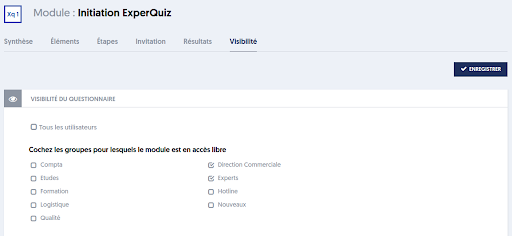
The procedure is very simple:
- By checking the label for all users, you make the module visible (and thus playable) to all users in your organization.
- Otherwise, by checking one or more of the user groups, you make the module visible to users belonging to those groups.
Of course, if you later assign a user to one of the groups selected here, that will automatically give them visibility on this module.