User Editing
Some fields have been reorganized within the blocks.
A new block "Authorization Profiles" allows defining the authorization profile.
A user can have multiple profiles and inherit the authorizations associated with each profile.
The authorizations provided by a profile are preceded by a P, while those added specifically are indicated by the activation of the selection button.
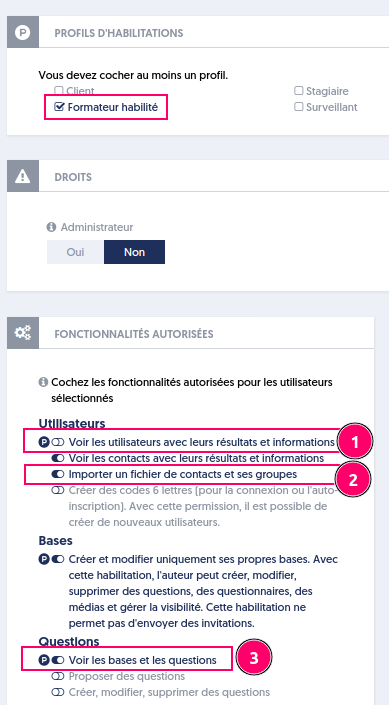
In the example above:
- The authorization "View users with their results and information" comes from a profile.
- The authorization "Import a contacts file and its groups" is chosen individually: it is a personal authorization.
- The authorization "View questionnaires" comes from a profile and is also a personal authorization.
If the profile is deleted, authorization (1) is removed, unlike (3) because it is also a personal authorization.