Select Module Items
A module will consist of a series of steps, each step being either a course step or an assessment step. Course steps are defined by media, which are generally either videos or materials such as PDF documents, PowerPoint, etc. Assessment steps are defined by questionnaires.
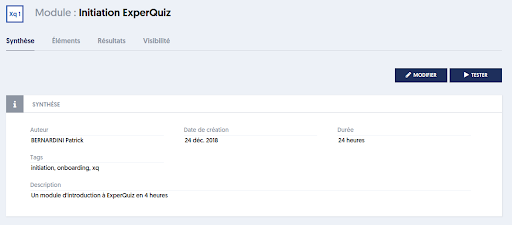
On the module summary page, click on the Items tab.
The next page allows you to choose the media and questionnaires that will be used in your new module.
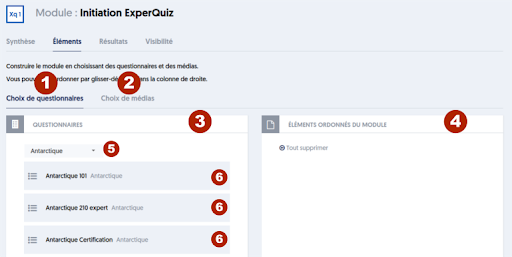
The principle of this page is similar to that of many other pages in ExperQuiz: you have two columns: on the left [3] are the available items, and on the right [4] are the selected items.
You can move the items (markers [6] in the image) between these two columns by dragging and dropping.
There are a few specific features of this page:
- Since the elements of your module can be either questionnaires or media, you have two tabs: [1] Questionnaire Selection and [2] Media Selection, allowing you to display either questionnaires or available media in the left column.
- When you are on the Questionnaire Selection tab, the left block has a filter (marker [5] in the image) that allows you to display only the questionnaires from a question database.
- When you are on the Media Selection tab, you have two filters: one to choose media from a database and the other to select only a specific type of media.
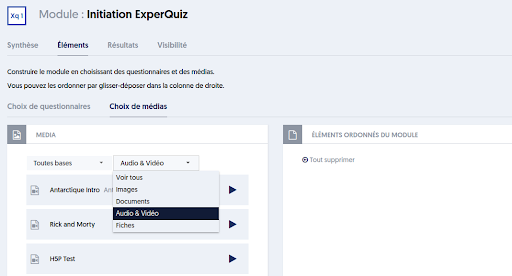
You select either media or questionnaires by dropping them into the right column, titled ORDERED MODULE ITEMS.
Within the right column, you can also arrange the selected items by dragging and dropping. This defines the order in which the steps of the module will be presented.
Note that, on this page, there is no SAVE button: changes are saved continuously, each time you move an item.
Once you have made your selection of items and arranged them, return to the Summary tab.
A new tab appears, titled STEPS. Click on this tab to better define each of the steps in the module.
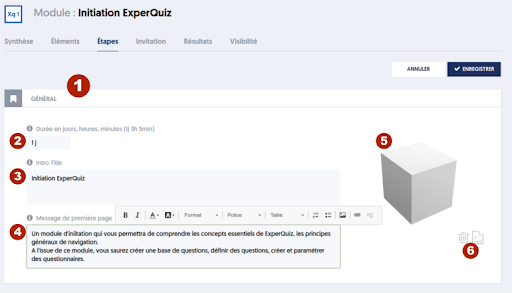
This page consists of a set of blocks: one block for each of the module items, as well as a block titled GENERAL and a block ATTENDANCE CERTIFICATE, if you have selected the corresponding option.
The general block, shown in the previous image (marker [1]), includes the following fields:
- [2] Module Duration. Modules can vary greatly in duration, from under an hour for some to several days for others. Therefore, there is no implicit unit for this field: you can indicate "40mn" for "40 minutes", "1h 5min" for "one hour and five minutes", or "3j 8h" for "three days and eight hours".
- [3] The title of the introduction
- [4] An introductory message that will constitute the first page of the module. This can be a full page, including images if necessary. A small text editor allows you to integrate formatting into your text.
- [5] An image that will illustrate the module's introduction. Use the buttons in [6] to upload a new image or delete the chosen image.
Scrolling down the page, you will access the following blocks, which correspond to the course steps and assessment steps you have selected.
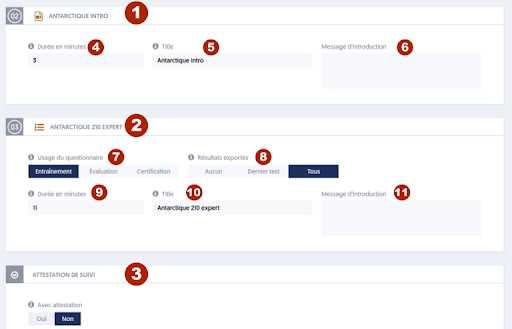
In the previous image, you can see two steps, out of the three defined for this module: [1] step 02, titled ANTARCTIC INTRO, and step 03, titled ANTARCTIC 210 EXPERT. The first is a course step consisting of a video, while the second is an assessment step, thus defined by a questionnaire.
For course steps, you can define:
- [4] The duration of the step
- [5] A new title for the step. By default, the name of the video is used.
- [6] An introductory message that explains to the user the purpose of this step, what they will learn, and how it fits into the module.
For assessment steps, you can define:
- [7] The use of the questionnaire, meaning its role in the module. We will detail this further below.
- [8] The extent to which the results of the questionnaire will factor into the module results.
- [9] The duration of the questionnaire in minutes. Note that this duration does not replace the duration specified at the questionnaire level; it is purely informative here.
- [10] The title of the step.
- [11] An introductory message explaining the purpose of this test.
A questionnaire can be integrated into a module in different ways:
- As practice, meaning that the module user can take this test if they wish and as many times as they want, without consequences, i.e., without affecting progress in the module.
- As an evaluation or certification, meaning that the user must achieve a certain success rate to continue in the module. If you choose one of these two modes, evaluation or certification, you will also indicate the minimum success rate required to progress, as well as the maximum number of attempts to achieve it.
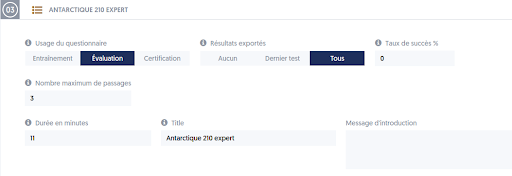
Thus, if they do not achieve the required score on their first attempt, the user will be able to review the previous course step and then retry, within the limit of the allowed number of attempts.
If, after the maximum number of attempts, the user has not reached the required score, they will not be able to advance in the module, and the module will be considered failed.
The evaluation and certification modes are quite similar, with two small differences:
- As mentioned above, regarding questionnaire options, if in certification mode, questions marked as essential will be eliminatory, meaning that regardless of the score obtained, the questionnaire is not passed if the user failed an essential question.
- If the questionnaire is a certification, it will be possible to associate a diploma that will be awarded to the user.
All options defined for the questionnaire, such as single page or question by question, time control, presentation of explanations, etc., will be used when the questionnaire is integrated into a module. Only certain options can be modified at the module level: certification mode, success threshold, and duration of testing.