Notification in Case of Module Failure
E-learning modules consist of various steps to follow. A user who completes the module will validate it if they successfully follow all the steps. It may happen that the learner does not validate the module.
The results obtained by a user on a module are presented on the “Results” page under the “Users” tab. It is possible to filter the results of failed modules.
Several reasons can lead to a failure:
- All allowed attempts to succeed at an assessment step have been used but without success (filter: failed by invalidated step)
- The module has not been completed within the time allotted by the administrator (filter: failed by incomplete module)
- The module has not been started (filter: failed by unstarted module)

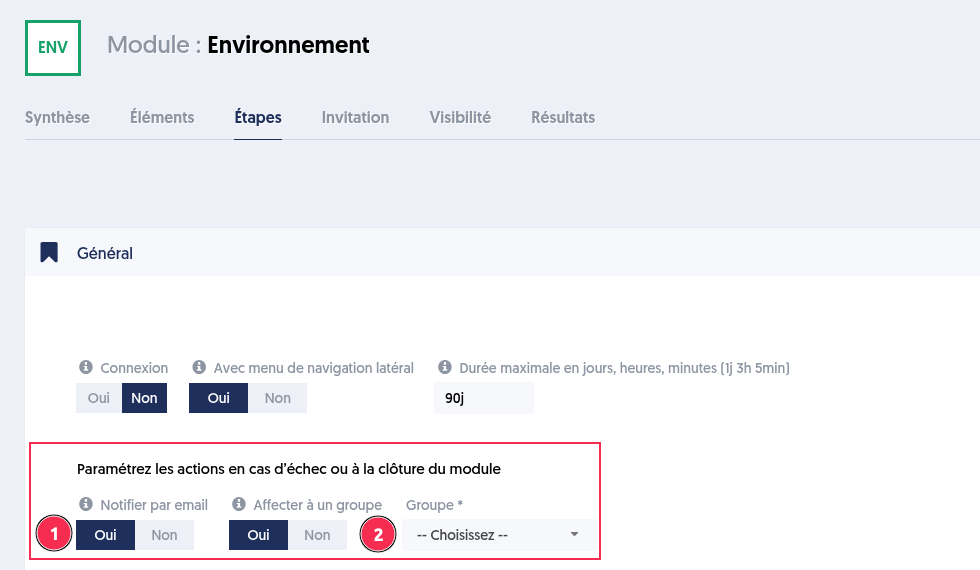
You can configure actions in case of failure or at the closure of a module.
Notify by email: an email is sent to the contact address defined in the company settings when a user fails, as well as at the closure of the module to indicate that the results are available.
Assign to a group: if the user fails, they can be automatically added to a group to facilitate their follow-up.
Article Navigation
Previous Previous article: Automated correction function for open questions