Invitation Import File
When the schedule for invitations to activities is known in advance, there is often a need to manage them in bulk without necessarily using the APIs.
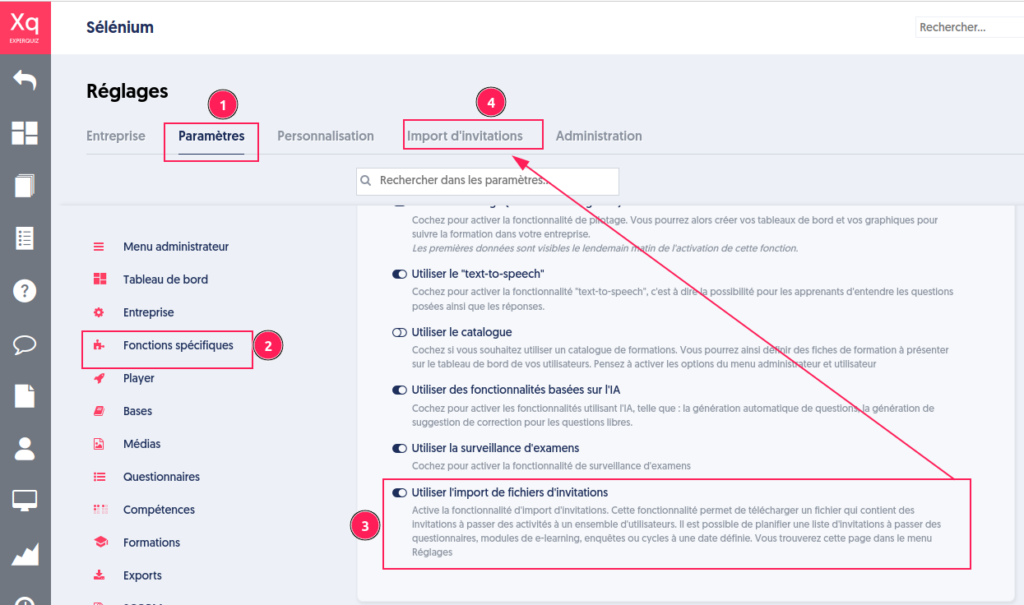
A new bulk invitation file import feature can be activated from the “Settings” menu, under the “Parameters” tab [1] of the company, in the “Specific Functions” section [2]. By checking the option “Use invitation file import” [3] and then saving, the “Invitation Import” menu [4] becomes accessible.
As with each import page (questions, users, glossary, skills, etc.), you will find a sample file that provides instructions for preparing the Xlsx file.
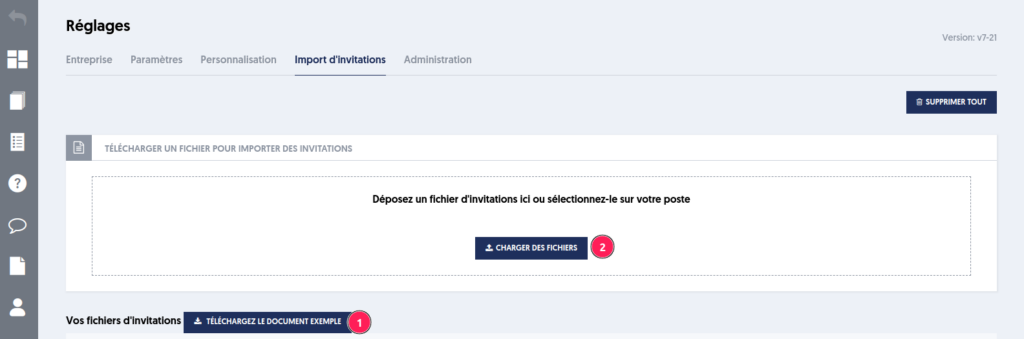
The invitation import file is an Excel file that defines for each line:
- The type of invitation from the following list of 6: questionnaire, module, survey, cycle, independent pathway (which retains open modules), planned pathway
- The list of groups separated by a comma
- The unique user if the group list is not provided
- The start date and time in the future
- The end date of the start period in the future, occurring after the start date
- The resend period except for cycles
- The reminder period after the start, only in the context of modules

The file is analyzed to check for the existence and consistency of the data.
A summary is provided with the number of invitations [1], the number of imported invitations [2], the number of remarks [3] in case of failure, and the status [4] (failed, successful, or partial import). A details panel [5] presents the errors from the file.
Article Navigation
Previous Previous Article: Notification in case of module failure