Certificate of Course Completion
An e-learning course is a sequence of modules.
This feature allows you to configure the certificate of module completion with a summary of the results of the completed modules.
Certificate Configuration
To do this, go to the new "Options" tab.
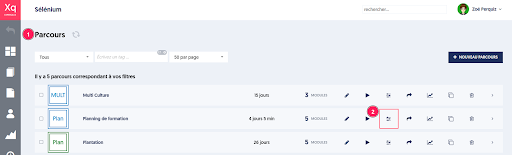
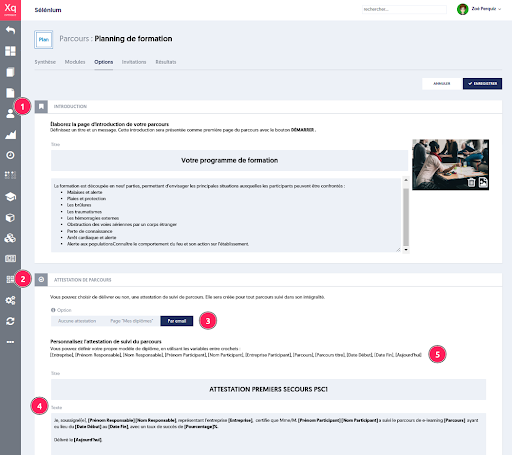
The page presents two main sections:
- The configuration of the introduction that will be displayed at the start of your course if the course is presented in scheduled mode.
- The configuration of the certificate with its title and text.
When a course is completed in its entirety, the certificate will be generated and sent or not to the user depending on the chosen option.
List of Course Completion Certificates
Administrator Side
The list of issued certificates can be found in the Diplomas menu [1), on the Courses tab [2).
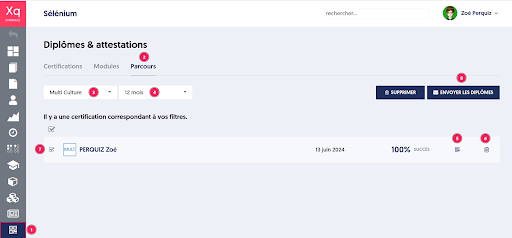
There are filters available to choose the course [3] and the period of issuance [4].
You can download the certificate [5], delete it [6].
It is also possible to select a list of certificates [7] to resend them to their holders [8] or delete them.
User Side
A learner can access their certificates in the "My Diplomas" menu.
The display of this menu is configurable by the administrator in the "Settings" menu, "Customization" tab, and "User Menu".
Re-generation of Certificate
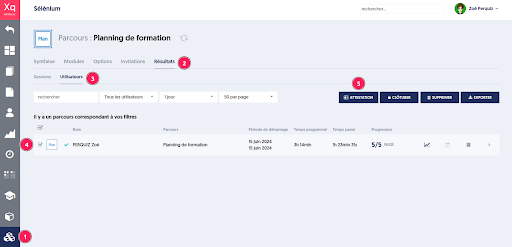
It is possible to regenerate the certificates afterwards either because the option was not chosen, or because the certificate template has been updated.
To do this, go to the Courses menu [1] on the Users [3] Results tab [2], then select the certificates to regenerate [4] and click on the CERTIFICATE button [5].
Article Navigation
Previous Previous Article: Generation of Questions by AI with a Documentary Corpus
Next Next Article: Automated Correction Function for Open Questions