Survey Steps
If you have chosen to use surveys, that is, information gathering operations based on forms that you have defined, you can schedule the sending of these surveys in the same way that you plan the submission of questionnaires.
At the bottom of the list of databases, you have an additional choice titled Surveys.
When you select this option, the left column will present all the survey forms that you have defined.
The operating procedure is the same as for the questionnaires; you can either drag and drop or use the arrow located to the left of each survey.
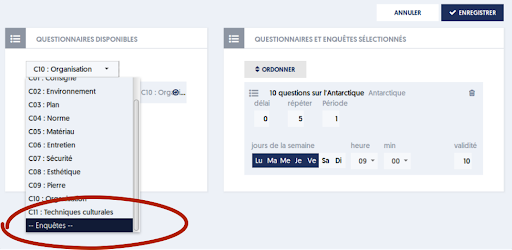
There are two small differences in scheduling surveys compared to questionnaires:
- For surveys, you do not need to specify the allowed days of the week; the survey will be sent regardless of the day of the week.
- For a survey, if you specify a number of repetitions and a period, these parameters will define the recall modalities for the survey when the user has not yet responded.
In other words:
- For a questionnaire, if you specify a number of repetitions and a period, the questionnaire will be submitted to the user multiple times, as many times as you specified. This is particularly relevant when your questionnaire is dynamic, meaning it presents a random selection of questions, so that each presentation of the questionnaire will be different from the previous one.
- A survey, on the other hand, will only be presented once. If you have specified a number of repetitions, then the survey will be offered again to the user ONLY if they have not yet responded. The scheduling thus pertains to reminders.