AI Question Generation with a Document Corpus
Question generation is no longer limited to the "universal" knowledge already ingested by OpenAI but can also target company-specific knowledge. You can add to your corpus an internal regulation, product documentation, training support, etc.
Choosing the Document Corpus
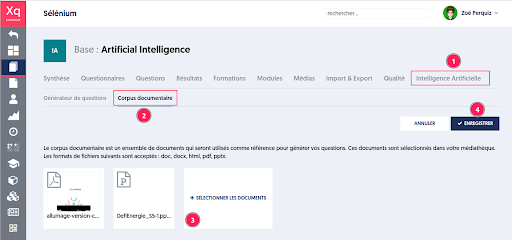
The administrator can define their own document corpus, from which the questions will be generated. This allows for the customization and narrowing of the information sources on which the generative AI will rely to create new questions.
To do this:
- Go to the "Artificial Intelligence" page of the chosen database.
- Then to the "Document Corpus" tab.
- Select documents in doc, docx, html, pdf, or pptx format. Documents are chosen from your media library, but you can import new ones if necessary.
- Save the selection of documents before leaving the page.
Question Generation
Question generation can be configured based on all or part of the documents.
To do this:
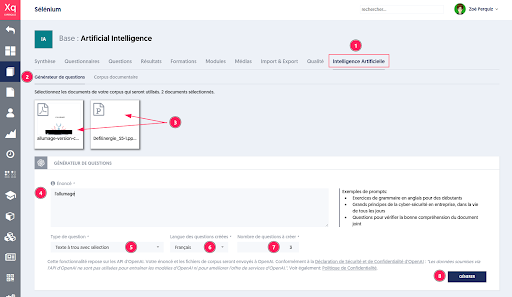
- Go to the "Artificial Intelligence" page of the chosen database.
- Then to the "Question Generator" tab.
- The list of documents in the corpus is presented at the top of the page. Select the document(s) to use for question creation. Click on the documents to select or deselect them.
- Provide the statement or topic, which can be a chapter or the title of the document.
- Choose the desired question type.
- Select the language.
- Indicate the number of questions.
- Start the generation by clicking the “GENERATE” button.
Validation of Generated Questions
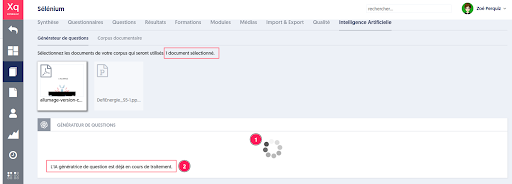
The generation starts, and a message indicates that it is in progress [1], [2].
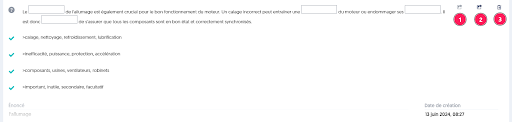
Questions are generated in real-time, and the administrator can:
- Accept the question in draft mode to adapt it.
- Validate the question, which will join the pool of questions that may comprise a questionnaire.
- Reject the question.
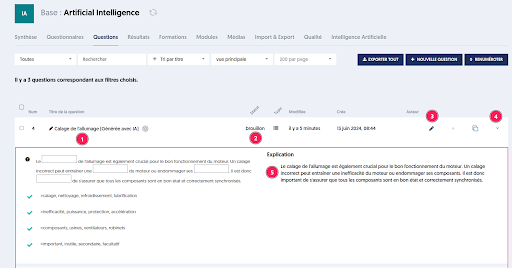
The accepted question [1] can be found in the database's question list; it is either active or in draft mode [2].
To integrate it into questionnaires, the administrator can edit the question [3] or view its content by opening the detail panel [4].
The AI has also generated an explanation that will be used in the feedback provided to the user during their test if this option has been selected.
GDPR, Security, and Privacy
This feature relies on OpenAI's APIs. Your statement and the corpus files will be sent to OpenAI.
In accordance with the OpenAI Security and Privacy Statement:
“Data submitted via the OpenAI API is not used to train OpenAI models or improve OpenAI's service offerings.”
See also: Privacy Policy