Administrator Mode & User Mode
Administrator/User views are available for users who:
- are either administrators (those who manage the platform and own the account)
- or have special permissions (for example "Create, edit, delete questions")
Navigation in ExperQuiz presents two modes: they can be in administrator mode or in user mode.
When they are in administrator mode, the menu allows them to access the administration functions they are authorized for.
When they are in user mode, the menu is the same as for 'ordinary' users, meaning without authorizations.
To always clearly identify which mode you are in, the rule is very simple:
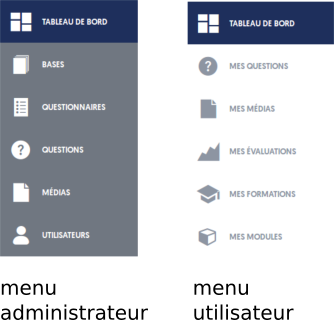
- In administrator mode, the main menu, on the left side of the page, is on a dark gray background
- In user mode, the main menu is on a white background
To switch from one mode to another, the selector is located in a small dropdown menu under the user's name, at the top right of all pages:
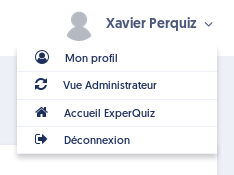
When you are in User view, the menu offers a switch to Administrator view, and vice versa.