The Trainer: Using Questionnaires and Media
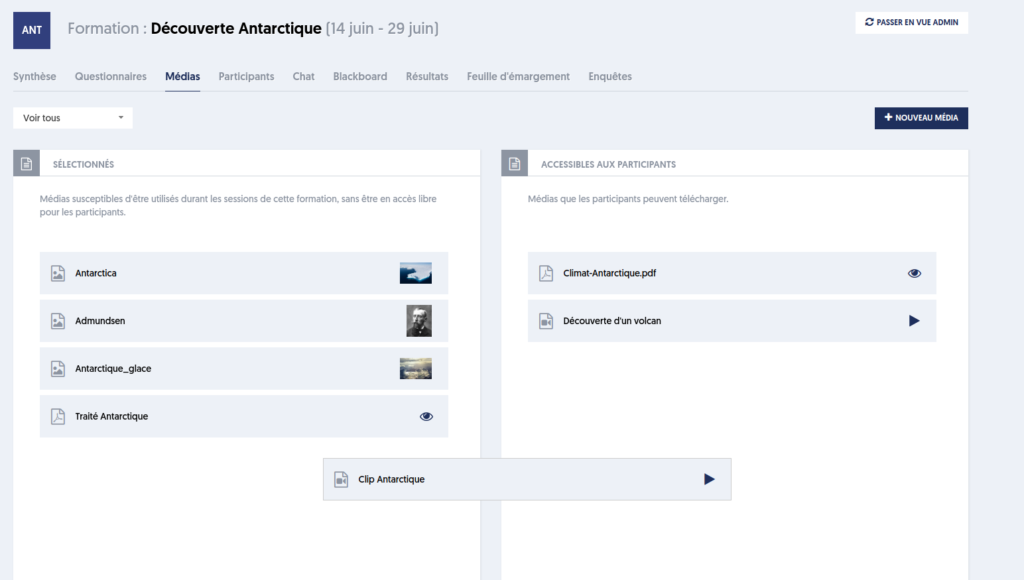
As mentioned earlier, the trainer can use the questionnaires and documents/media that have been selected for the training.
Making a Questionnaire Available to Participants
At the time the trainer finds pertinent, they can make a questionnaire available to participants in training mode, meaning they can take the corresponding test as many times as they wish.
This open access to a questionnaire differs from assessments that can be submitted to participants. An assessment, in general, is not optional; each participant must complete it. Furthermore, each participant can only take it once.
In the context of training, the trainer will have access to the results of the questionnaires made available to participants.
Submitting an Assessment to Participants
To submit an assessment to participants, the trainer goes to the Questionnaires tab.
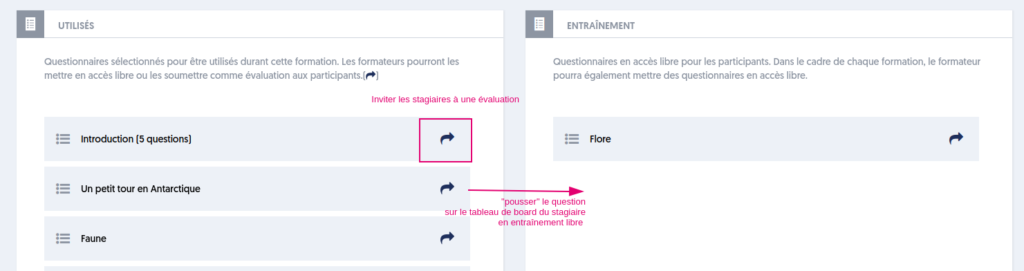
On each tile corresponding to a questionnaire, an invitation button is present on the right (marker [1] in the image).
By clicking on this button, a panel appears on the right side of the screen allowing the trainer to finalize the invitation.
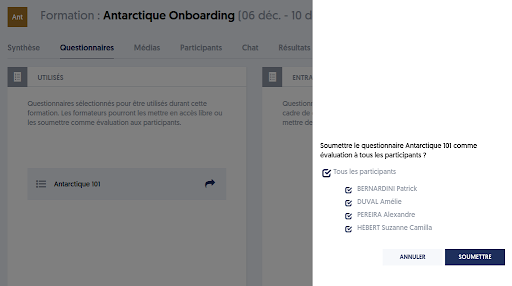
The trainer can select the participants who will be invited to this assessment. They then click on the SUBMIT button, and the invitations are sent immediately.
In the context of training, users do not receive an invitation via email or SMS; they find the requested assessment immediately on their training dashboard page. We will explore later the perspective and actions of the participating user.
Note that all actions taken by the trainer that impact participants take effect instantly, in real-time. This means that participants do not have to refresh their dashboard page; it immediately reflects the trainer's actions.
Sharing Educational Material with Participants
To share a media item in real-time, simply drag and drop it from the left block (selected media) to the right block (media accessible to participants).
Conversely, it is possible to remove a media item by performing the reverse action (dragging and dropping from right to left).